> For the complete documentation index, see [llms.txt](https://help.remoteyon.com/llms.txt). Markdown versions of documentation pages are available by appending `.md` to page URLs; this page is available as [Markdown](https://help.remoteyon.com/germany-specific/how-to-create-an-e-invoice-german-e-rechnung-using-pdf24-tools.md).
# How to create an e-invoice \[German: E-Rechnung] using PDF24 Tools
This is only relevant for entrepreneurs in Germany, but before you panic, check with your tax attorney first if you really have to send out or receive invoices in this specific format.
{% hint style="warning" %}
I'm an IT guy, not a tax attorney. Please consult a professional when it comes to taxes or law in Germany.
{% endhint %}
## Running PDF24 Tools:
* Option 1: Use the e-invoice generator directly in your browser by visiting [this link for the English version](https://tools.pdf24.org/en/create-electronic-invoice) or [this link for the German version](https://tools.pdf24.org/de/elektronische-rechnung-erstellen).
* Option 2: [Download](https://tools.pdf24.org/en/creator) and Install the program (Windows only) on your PC to run it without the need for an internet connection. \[German download website [here](https://tools.pdf24.org/de/creator)]
* Option 3: Install via Winget: `winget.exe install --id "MartiCliment.UniGetUI" --exact --source winget --accept-source-agreements --disable-interactivity --silent --accept-package-agreements --force`
## Open PDF24 Toolbox
* Look for the "Create invoice" box.\

* Optional: Click the star icon so it appears on top the next time you use the program.
* Click the "Create invoice" box once to open it.
* You'll have two options:
* Create invoice visually: I do not recommend this option. I tested it in January 2026 and the generated invoice [was not validated correctly](#validating-the-created-invoice).
* Create electronic invoice: This works, and the PDF and XML files created with it [get validated correctly](#validating-the-created-invoice).
## Fill in the fields:
* Fill in the fields to the best of your ability. The required fields will be marked pink in light theme and purple in dark theme.
* Don't worry if you can't fill out all the required fields. At the end of the form, you'll be able to create the invoice *without* validation if necessary.
* If you're not sure what the field "BT-xx", etc. means, you can always look it up on the internet.
* In reality, not all the "required" fields are really necessary. Please check with a tax professional first.
## Create an e-invoice
* Scroll down to the section "Output options"
* The two major formats are either "PDF" or "XML". Usually the first sub-format on the list works, but check with your tax professional first.
* The PDF options will generate a human-readable PDF and embed the machine-readable XML file inside of it. Here's an example in Adobe Acrobat:\
* The XML options will generate only the XML file. This is optimal if you already have a preferred design for your PDF invoices and you just need to embed or add the XML to it.
* Click the "Create invoice" button
* If a required field is missing, you'll get an error message:\
* If your tax professional tells you a certain required field doesn't apply to your case, you can click "Create invoice without validation"
## Validating the created invoice
To make sure your PDF or XML invoice is validated, paste it into the visualizer on the website of [Germany's official, free online portal for submitting tax information, "ELSTER"](https://www.elster.de/eportal/e-rechnung?locale=en_US).
If you get an error, there's something wrong with your e-invoice, otherwise you'll get a visual representation of the XML data.

 * The XML options will generate only the XML file. This is optimal if you already have a preferred design for your PDF invoices and you just need to embed or add the XML to it.
* Click the "Create invoice" button
* If a required field is missing, you'll get an error message:\
* The XML options will generate only the XML file. This is optimal if you already have a preferred design for your PDF invoices and you just need to embed or add the XML to it.
* Click the "Create invoice" button
* If a required field is missing, you'll get an error message:\ 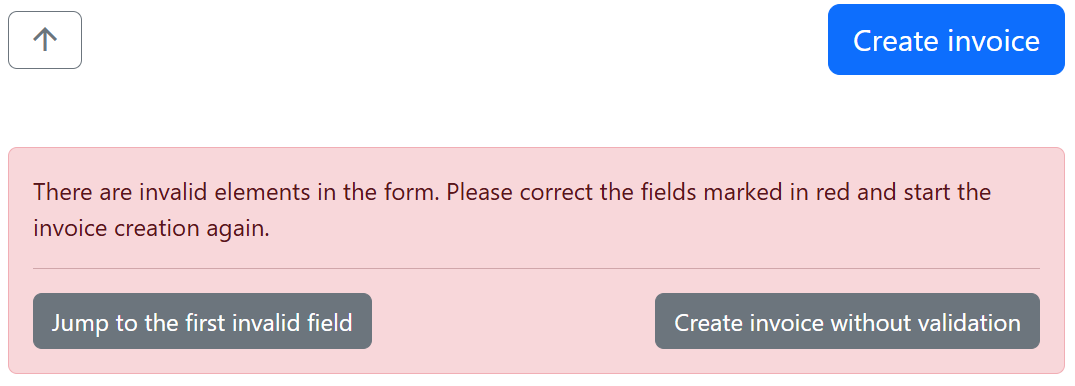 * If your tax professional tells you a certain required field doesn't apply to your case, you can click "Create invoice without validation"
## Validating the created invoice
To make sure your PDF or XML invoice is validated, paste it into the visualizer on the website of [Germany's official, free online portal for submitting tax information, "ELSTER"](https://www.elster.de/eportal/e-rechnung?locale=en_US).
If you get an error, there's something wrong with your e-invoice, otherwise you'll get a visual representation of the XML data.
* If your tax professional tells you a certain required field doesn't apply to your case, you can click "Create invoice without validation"
## Validating the created invoice
To make sure your PDF or XML invoice is validated, paste it into the visualizer on the website of [Germany's official, free online portal for submitting tax information, "ELSTER"](https://www.elster.de/eportal/e-rechnung?locale=en_US).
If you get an error, there's something wrong with your e-invoice, otherwise you'll get a visual representation of the XML data.